

LR Appli
← All apps

Simple 草野球スコア

A plate-appearance log for amateur baseball, made to be filled in one-handed, in seconds, from the bench.

Everyone batting or a fixed order, re-entry, a game called on time: it records the game by sandlot rules as they are. Afterwards you can replay the game one play at a time. No account, no server. The app itself is in Japanese only.

Coming soon on Android Free to try, no ads
Features
01

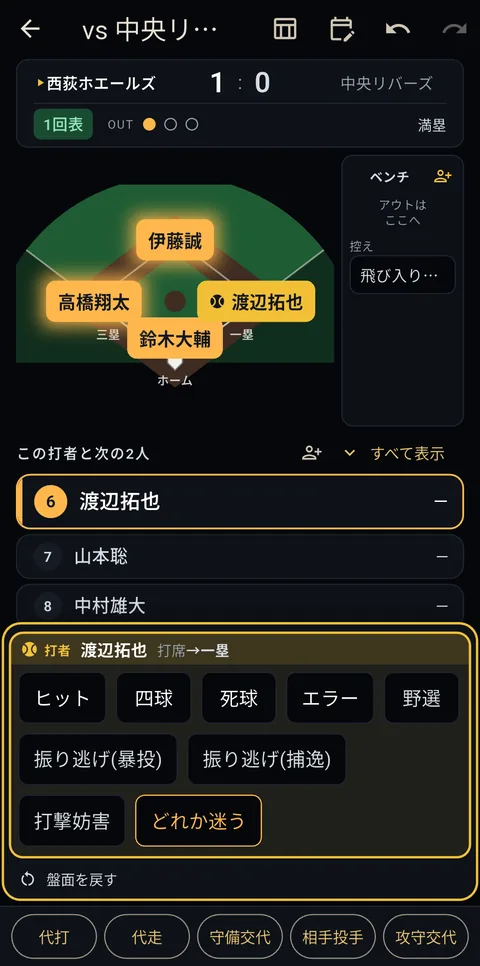
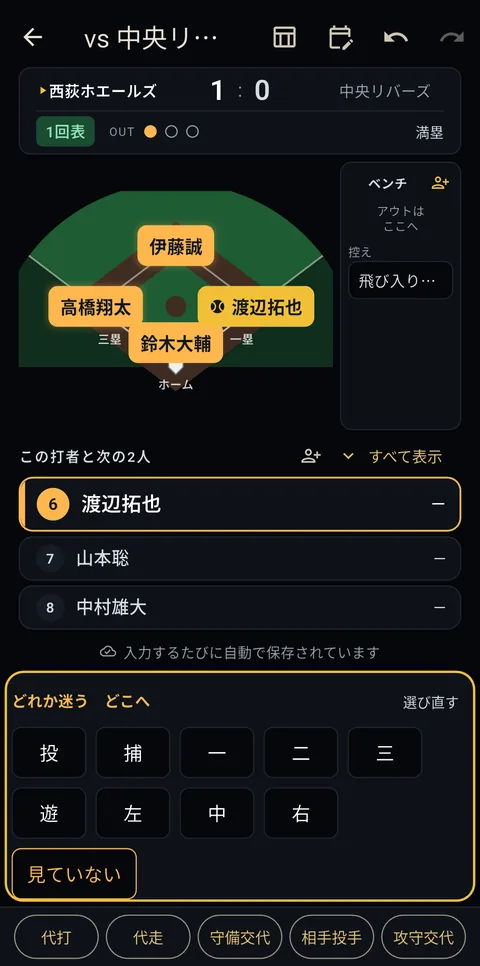
Unsure? Log it as tentative

Cannot tell a hit from an error? Log it as tentative and move on, then settle it later. The point is that a judgement call never stops you from keeping up with the game.

02

Plays by sandlot rules

Each game is set to either "everyone bats" or a fixed batting order; with a fixed order, a sub coming in off the bench takes over the batting slot of the player they replace. Any number in the batting order, free re-entry, no inning limit. A game called after three innings is still a game. The app never decides what is "correct", so you record what actually happened.

03

Replay it one play at a time

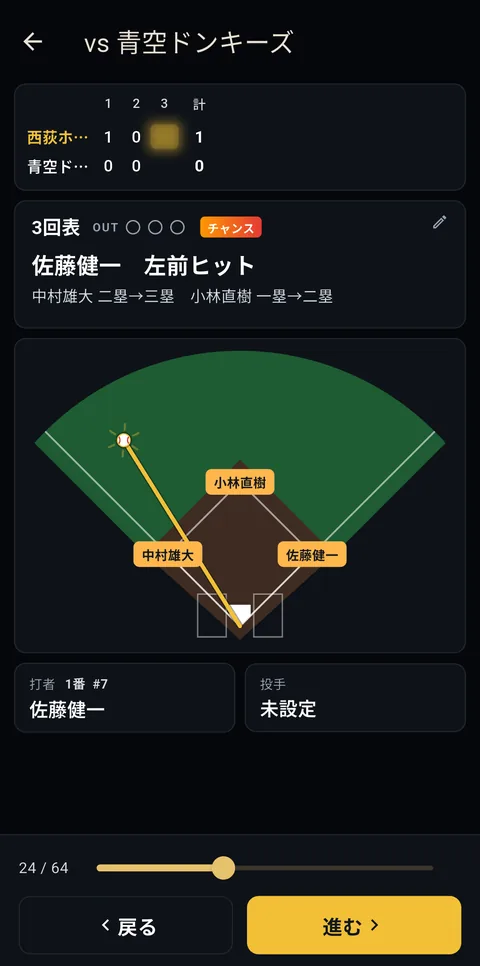
After the game, every tap of the forward button moves one play on, with the runners actually moving around the bases — you watch the game back instead of reading a scoresheet. Hold to fast-forward. Steals and wild pitches step through one by one, and anything you notice can be written in on the spot. Notes jotted down during the game turn up at the play they belong to.

04

No account, shared by QR

No sign-up, no login — open it and start writing. Hand a game to your teammates as a QR code, and reading a shared code is free for their first two games if they have the app.

05

Pitching lines, and who you hit off

Name a pitcher when you set up the game and you get innings, hits, strikeouts, walks, runs and earned runs, with an ERA across the season. Log the opposing pitchers as they change and you can see how the team hit against each of their pitchers.

06

A separate roster for each team

Play for more than one team? Keep them apart. Games, roster and career stats show only the team you have selected, and a game received by QR from another team never mixes into your own numbers.

Screens

Your first two games are free; the third onward needs the one-time payment. "Paid" marks a screen that requires it. The app is in Japanese only, so these are the screens as you would see them.

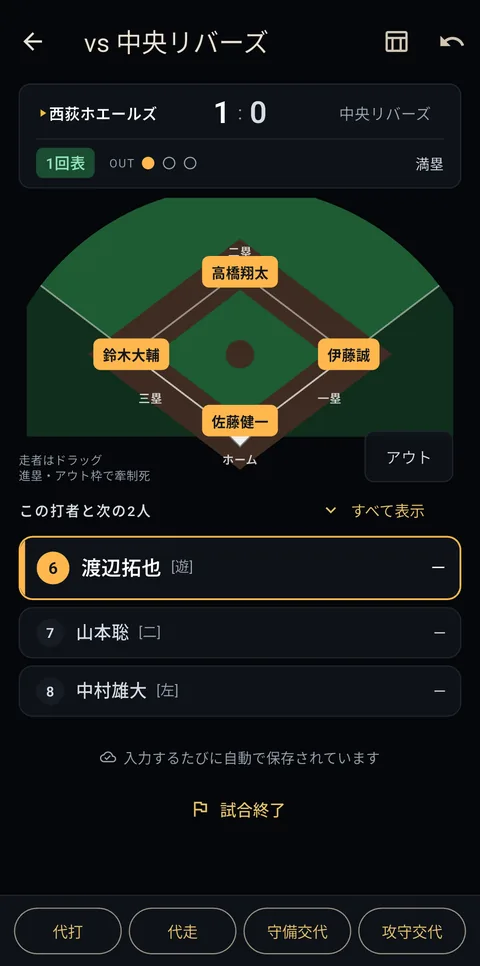
A game in progress: runners and batting order
01 A game in progress: runners and batting order
Move a piece; only the possible results appear
02 Move a piece; only the possible results appear
Log a hit or error without deciding
03 Log a hit or error without deciding
Step through the game one play at a time
04 Step through the game one play at a time
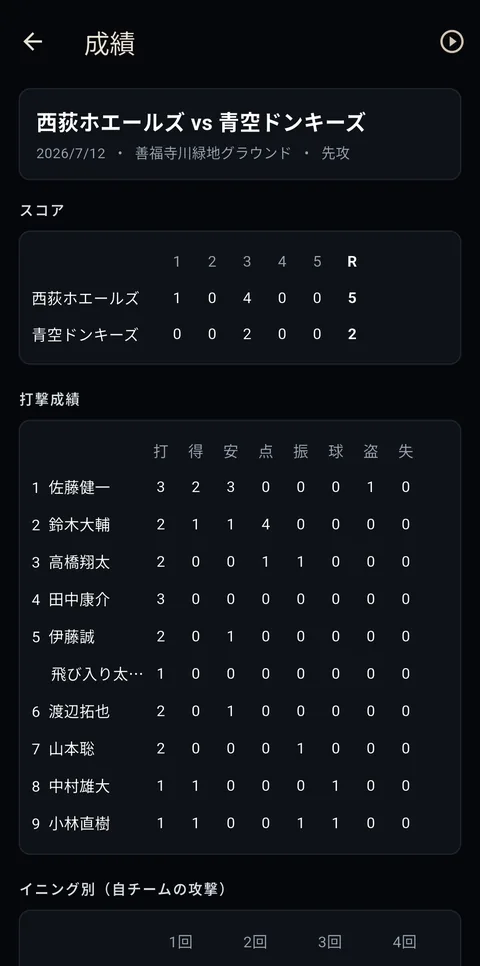
Score and batting for one game
05 Score and batting for one game
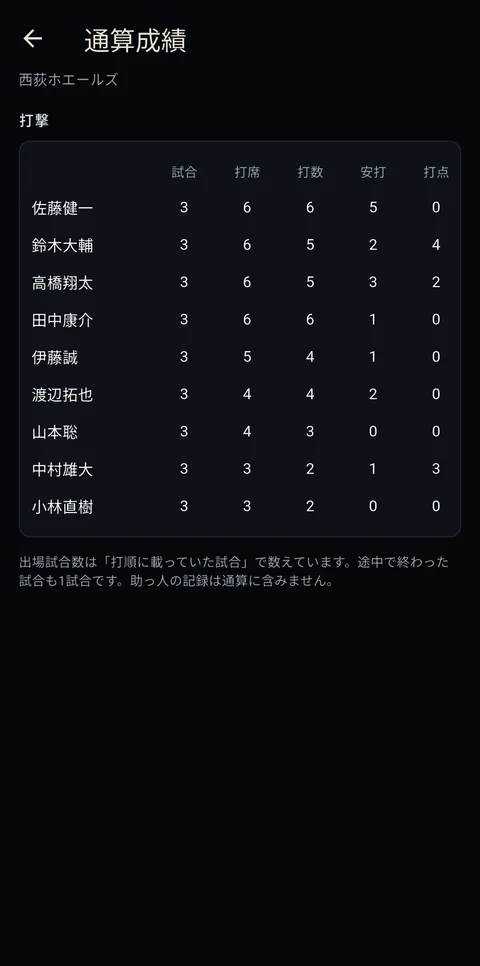
Career totals per player
06 Career totals per player
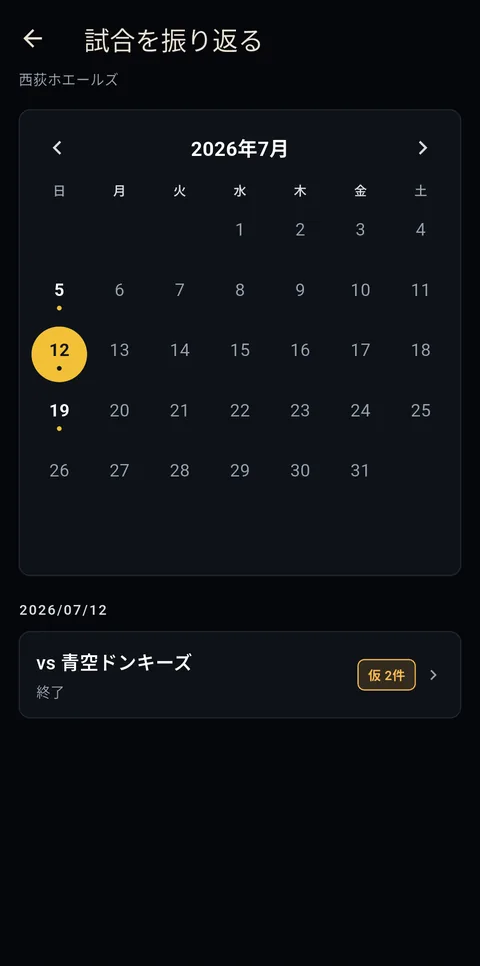
Find a past game by date
07 Find a past game by date
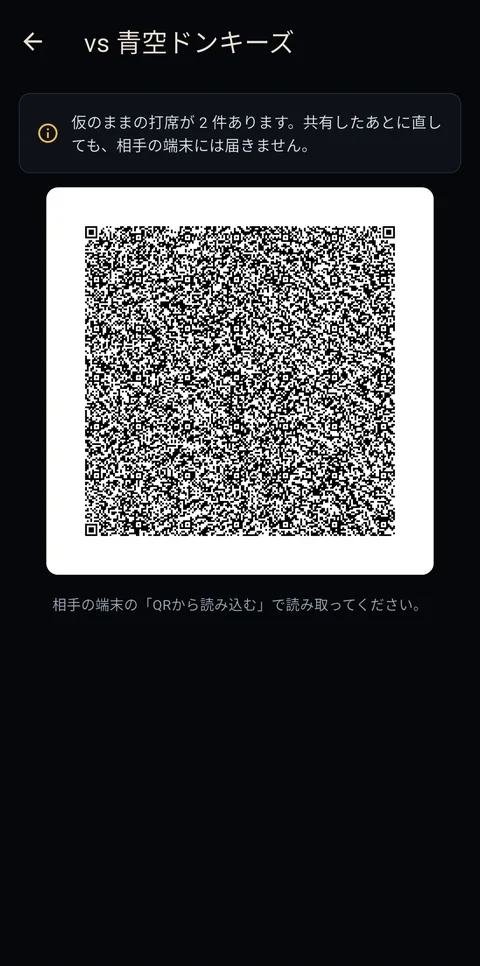
Hand a game over by QR code
08 Hand a game over by QR code

These screens come from a build still in development, and the released app may look different.

Type the roster on a computer and hand it over by QR code. Entering a dozen names on a phone is a chore, so there is a roster builder you can use with a keyboard. Save it as CSV and it is ready again next season.

Roster builder →
FAQ
How much can I do without paying?

Every screen and every input feature is free to use. Nothing is held back. Your first two games are free, and the third onward is unlocked with a one-off payment of ¥300 — this applies both to games you record yourself and to games shared with you.

The first game you share by QR code is free; sharing a second one needs the payment. Sharing a player roster is always free. On the receiving side, the first two games are free (the reader does need this app installed).

Can it keep a proper scorebook?

No. This is a log of plate-appearance results, not a replacement for a paper scorebook. It does not track the ball-strike count and cannot produce a record that follows the official rules.

What it does instead is stay narrow: enter a result one-handed in seconds from the bench, and get batting averages after the game. If you need a formal record, a dedicated scorebook app will serve you better.

Can I watch a game back?

Yes. Open a game and start the replay, and each tap of the forward button moves one play on. The runners actually move around the bases, so you can follow the game as it happened. Hold it to fast-forward, and step backwards with the button beside it.

Advances made by the batter are folded into that plate appearance, but steals, wild pitches and passed balls each stop on their own — they happen independently of the at-bat, so they are worth looking at one at a time.

While replaying, you can add to, correct or delete the record at that point. That is the intended way to settle a plate appearance you left marked tentative: watch what happened, then decide.

Notes written during the game (up to 20 characters) appear at the play they belong to. When a runner reaches scoring position, the replay says "chance" if it is your team batting and "pinch" if it is theirs.

Does it keep pitching stats?

Yes. Name a pitcher when you set up the game and each game shows innings, batters faced, hits, strikeouts, walks, runs and earned runs, with an ERA in the season totals. Pitching changes are entered as fielding changes. When a pitcher leaves with runners on base and one of them scores, the run is charged to the pitcher who put that runner on.

Opposing pitchers are recorded by shirt number only. Log their changes and you can see how your team hit against each of them (their fielding is not recorded, so no earned runs are shown for them).

Can the team share the records?

A single game can be shown as a QR code and read with another phone's camera. Player rosters can be handed out the same way.

We run no server, so the handover happens directly between devices. No internet connection and no account are required.

The first game you share is free. Sharing a second one needs the payment (re-sharing that first game, corrections and all, stays free). Sharing a player roster is free too, and can also be done from the roster builder above. Receiving one is free for the first two games (the reader does need this app installed).

Can I delete games and players?

Games and players can be deleted freely, at any time. Creating a game just to practise entering results and then deleting it is a perfectly normal way to use the app.

Story

We kept score on paper, on the bench. It is harder to write than it looks if you have not done it before, the wind turns the pages, and everything has to be copied into Excel afterwards to add up. The apps already out there did too much, and were awkward enough that nobody would open one just to look back at a game.

So I built the other thing: something anyone can fill in while the game is going on, and that adds itself up once it is over.

Questions that apply to every app — supported devices, payment — are collected in the FAQ on the top page. If yours is not answered, please reach us through the contact form.

Contact form
LR Appli
← {{ t.back }}

Simple 草野球スコア

{{ t.appLede }}

{{ t.appDesc }}

{{ t.appStatus }} {{ t.appBadge }}
{{ t.secFeatures }}
01

{{ t.feat1h }}

{{ t.feat1p }}

02

{{ t.feat2h }}

{{ t.feat2p }}

03

{{ t.feat4h }}

{{ t.feat4p }}

04

{{ t.feat3h }}

{{ t.feat3p }}

05

{{ t.feat5h }}

{{ t.feat5p }}

06

{{ t.feat6h }}

{{ t.feat6p }}

{{ t.secShots }}

{{ t.shotsLead }}

{{ shot.cap }}
{{ shot.no }} {{ shot.cap }}

{{ t.shotsNote }}

{{ t.rosterStrong }}{{ t.roster1 }}{{ t.rosterLink }}{{ t.roster2 }}

{{ t.rosterBtn }} →
{{ t.secFaq }}
{{ item.q }}
{{ item.body }}
{{ t.secStory }}

{{ t.story1 }}

{{ t.story2 }}

{{ t.cs1 }}{{ t.csLink }}{{ t.cs2 }}

{{ t.contactBtn }}